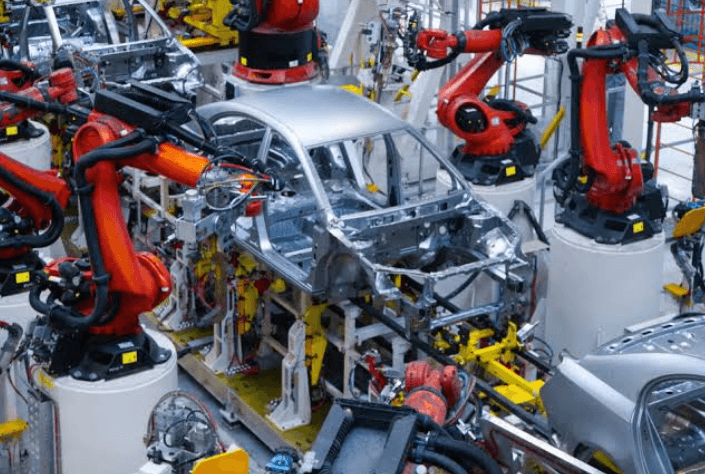
Quality control is an essential part of modern manufacturing. As production lines become faster and manufacturers handle increasingly detailed products, identifying defects quickly can become challenging. Manual inspection still has an important role, but continuously examining every product or material section can be difficult, particularly in high-speed environments.
Automated technology provides manufacturers with another way to monitor production. By using cameras, sensors, image-processing software, and automated analysis, a defect detection machine can examine products or materials and identify potential problems during the manufacturing process.
The objective is not simply to find defective items. Effective automated inspection can also provide earlier information, reduce unnecessary waste, and support more consistent production.
What Is Automated Defect Detection?
Automated defect detection is a quality-control process that uses technology to identify unwanted differences or imperfections in manufactured products or materials.
A typical system captures information through cameras or other inspection devices. Software then analyzes the captured data and compares it with predefined quality requirements or an approved reference.
When a potential defect is identified, the system can alert production personnel. Depending on the manufacturing setup, the information may also be recorded for later analysis.
This allows inspection to become a continuous part of production rather than something performed only after manufacturing is complete.
Why Automated Detection Is Becoming Important
Modern production lines can operate continuously for long periods. At high speeds, a small problem can affect a large quantity of material before it becomes visible during a manual quality check.
Sampling-based inspection can provide useful information, but it does not necessarily identify every defect.
Automated inspection can provide broader coverage by monitoring production continuously.
This can be especially valuable when product appearance, consistency, or surface quality is important.
How the Technology Works
The basic process involves several stages.
First, cameras or other sensors capture information about the product or material. The inspection software then processes this information and evaluates it according to configured criteria.
If the system identifies an unusual feature, it can generate an alert.
A general workflow may include:
- Product or material enters the inspection area.
- Imaging equipment captures visual information.
- Software processes the captured images.
- Inspection criteria are applied.
- Potential defects are identified.
- Operators receive an alert.
- Production personnel investigate and respond.
The exact process depends on the type of manufacturing application and inspection requirements.
Types of Defects That Can Be Detected
Automated systems can be configured to identify different types of defects.
Missing or Incomplete Elements
In printed products, a section of text, graphics, or another element may be missing. Automated comparison can help identify differences from an approved reference.
Spots and Marks
Unwanted marks can occur because of contamination, material handling, ink, equipment conditions, or other production factors.
Scratches and Surface Damage
Products with important surface characteristics may need to be checked for scratches, imperfections, or other unwanted marks.
Registration or Alignment Problems
Where multiple elements need to align accurately, automated visual inspection can help identify unwanted variations.
Color Differences
Changes in production conditions can sometimes create visible differences in color. Appropriate imaging and software can help monitor these variations.
The Role of Cameras
Cameras are a major component of many automated inspection solutions.
The appropriate camera setup depends on production speed, inspection area, material characteristics, and the size of defects that need to be identified.
A camera must capture sufficiently clear information while the product or material is moving through production.
Camera positioning is also important. The inspection area needs to provide a stable and useful view so that software can analyze images consistently.
Lighting and Image Quality
Lighting can significantly influence visual inspection.
Reflections, shadows, and glare may create unwanted differences in captured images. This can make it harder for software to distinguish genuine defects from environmental variations.
Manufacturers should therefore consider lighting as part of the complete inspection design.
A controlled lighting environment can help provide more consistent images and improve the reliability of automated analysis.
Software-Based Analysis
Capturing images is only one part of automated inspection.
Specialized software processes the captured information and evaluates it against configured inspection criteria.
Depending on the application, the software may examine shapes, patterns, colors, edges, surface characteristics, or differences from an approved reference.
Inspection settings need to be configured carefully. If the system is too sensitive, it may generate unnecessary alerts. If it is not sensitive enough, some relevant defects may not be identified.
Benefits of Automated Detection
Automated defect detection can provide several benefits for manufacturers.
Earlier Problem Identification
Potential defects can be identified closer to the point where they occur.
Reduced Waste
Early detection can give operators an opportunity to address problems before a larger quantity of material is affected.
Consistent Monitoring
Automated systems can continuously monitor production without the fatigue associated with prolonged manual observation.
Better Production Visibility
Inspection information can provide quality teams with a clearer understanding of production conditions.
Improved Operator Efficiency
Operators can focus their attention on relevant alerts and corrective decisions instead of continuously observing every product manually.
Reducing the Risk of Missed Defects
One of the biggest challenges in quality control is the possibility of defects escaping detection.
A manual inspector may check samples at regular intervals, but problems can occur between those checks.
Automated monitoring can reduce this gap by observing production continuously.
This does not mean that every possible defect will automatically be identified. Performance depends on system configuration, defect characteristics, material properties, lighting, software settings, and other factors.
Nevertheless, continuous automated inspection can strengthen the overall quality-control process.
Using Inspection Information for Improvement
Defect detection can also provide valuable production data.
When inspection results are recorded over time, manufacturers may identify recurring patterns.
For example, repeated defects might encourage a production team to investigate machine maintenance, material handling, process settings, or other possible causes.
This creates an opportunity to move from reactive quality control toward preventive improvement.
Instead of simply removing defective products, manufacturers can study why defects occur and work toward reducing their frequency.
Integration With Existing Production
Automated inspection should be integrated carefully into the existing production workflow.
Physical installation may require consideration of available space, product movement, camera positioning, lighting, and maintenance access.
The software interface should also be designed around operator needs.
Clear alerts and understandable inspection information can make it easier for production staff to respond without unnecessary disruption.
Selecting the Right Equipment
Manufacturers should consider several factors when evaluating automated inspection equipment.
These may include:
- Product or material type
- Production speed
- Inspection area
- Defect size
- Required image resolution
- Lighting conditions
- Camera configuration
- Software capabilities
- Reporting requirements
- Production-line integration
- Operator workflow
A solution should be selected according to the actual application rather than based solely on general technical features.
Businesses evaluating automated solutions can explore a defect detection machine as part of their quality-control planning.
Training Operators
Automation does not remove the need for experienced personnel.
Operators should understand how inspection alerts work and what actions may be required when a potential defect is detected.
Training can also help production teams understand the difference between genuine defects and acceptable variations.
When employees understand the technology, they can use inspection information more effectively and reduce unnecessary interruptions.
Maintenance and Calibration
Automated inspection equipment requires regular attention.
Cameras should remain correctly positioned, lighting should remain consistent, and inspection parameters should be reviewed when production conditions change.
New products, materials, designs, or machine configurations may require updated inspection settings.
Routine maintenance and calibration can help maintain consistent inspection performance over time.
Applications in Printing and Manufacturing
Automated defect detection can be useful in many production environments.
Printing operations may use visual inspection to monitor graphics, text, registration, colors, and surface appearance. Other manufacturing applications may focus on physical surface defects, missing components, scratches, contamination, or dimensional differences.
The appropriate inspection method depends on the product and the quality requirements of the business.
Frequently Asked Questions
1. What is a defect detection machine?
A defect detection machine is an automated inspection solution designed to identify potential defects in products or materials. It may use cameras, sensors, and software to analyze production output.
2. Can automated defect detection replace manual inspection?
Automated inspection is generally best used alongside human expertise. Technology can provide continuous monitoring, while operators investigate alerts and make production decisions.
3. Can automated detection reduce manufacturing waste?
It can help reduce waste by making potential problems visible earlier. Faster detection can give production teams more opportunity to correct an issue before a larger quantity of material is affected.
See also: Business Automation Technologies
Conclusion
Automated defect detection is becoming an increasingly valuable part of modern quality control. By combining imaging technology with software-based analysis, manufacturers can monitor production more consistently and identify potential problems earlier.
The benefits can include improved visibility, reduced waste, more consistent output, and better support for production decision-making. However, successful implementation depends on choosing suitable equipment, configuring inspection criteria correctly, maintaining the system, and training operators.
When automated technology and human expertise work together, manufacturers can build a stronger quality-control process that supports both production efficiency and reliable finished-product quality.